Designing for Intelligence
- My Role
- Lead UX Designer
- Timeline
- 2025–26
- Key Metric
- 45min → 4min
- Time on task, bulk update
Core challenge
Agentic AI · Retail Planning · Conversation Design
At a glance
Final solution at a glance
45min → 4min
Time on task, bulk update
62% → 94%
Task completion rate
23% → 3%
Error rate
4.2 → 8.5 /10
User trust score
01 — The Problem
What is CATMAN and who are we designing for?
Blue Yonder's CATMAN (Category Management) suite is used by category managers and space planners at global retail chains — brands like Walmart, Carrefour, and Tesco. These users manage planograms: precise layout maps dictating where every product sits on a retail shelf across thousands of stores.
Who Uses It
Category managers, space planners, and platform admins at the world's largest retailers — managing planograms that determine shelf layouts across thousands of store locations.
What They Do
Design, optimise, and maintain planograms — every product placement decision ripples across hundreds or thousands of stores and directly impacts sales performance.
At What Scale
A single change — one SKU in one category — could require manual updates across hundreds of store templates. No batch support meant opening, editing, and saving each file individually.
The Pain
Category managers were drowning in repetitive, high-stakes manual workflows. The tools were powerful but painfully slow. The demand for speed — from suppliers, ops teams, and seasonal resets — was relentless.
Research Scope
18 structured interviews · 6 users in Wizard-of-Oz testing (3 Category Managers, 3 Space Planners) · Survey analysis · Support ticket review · Contextual inquiry at Walgreens, Coop, ICA Gruppen, Elkjøp, Farmacias Peruanas, NorgesGruppen
02 — Role & Process
Manual. Fragmented. Painfully slow.
Before the Agent — How category managers worked
One at a Time
Opened each planogram file individually to make bulk updates — one by one, across hundreds of store templates with no way to apply changes at scale.
Manual Application
Manually applied changes across multiple instances with no batch capability — every store template edited and saved in isolation.
Copy-Paste Reporting
Generated reports by hand — copy-pasting data between disconnected tools with no version control, no audit trail, and hours of tedious aggregation.
Buried Configuration
Set up validation rules through deeply nested, unintuitive settings menus that took minutes just to navigate — slowing down every compliance check.
Outside-the-Product Coordination
Coordinated changes across teams via email chains and phone calls — no clarity on what changed, who changed it, or when. Zero audit trail.
No Operational Visibility
No real-time view into compliance status, task completion, or exception flags across locations — everything was retrospective, discovered after the fact.
After ShelfOps Agent — What became possible
Bulk updates triggered by a single natural language instruction to the agent
Reports generated instantly — structured, versioned, and ready to export
Validation rules created through a guided, conversational setup flow
Charts built on live planogram data in seconds, without leaving the workspace
Every agent action logged with full transparency and user override at every step
Cross-team changes proposed, reviewed, and approved within one surface
02.5 — Research & Validation
Validating the agent before a single line of production code.
We ran Wizard-of-Oz usability testing with 6 users (3 Category Managers, 3 Space Planners) in 45-minute sessions using a Slack-based chat simulation. The agent was a human operator behind the scenes — users believed they were interacting with a live AI. This let us test conversation flows, trust signals, and clarification patterns without engineering investment. We also conducted 18 structured interviews and analyzed survey responses, support tickets, and contextual inquiry data from retailers including Walgreens, Coop, ICA Gruppen, Elkjøp, Farmacias Peruanas, and NorgesGruppen.
03 — Defining the Agent
What should AI do — and what must the human decide?
The hardest question wasn't how the agent should look — it was how much authority it should have. We mapped every action against risk and reversibility. That became our trust model.
Bulk Updates
Agent handles: AI proposes changes across all affected planograms.
Human decides: Approves before any change is committed.
Report Creation
Agent handles: AI generates structured report from live planogram data.
Human decides: Reviews, edits scope, and exports.
Validation Rules
Agent handles: AI guides step-by-step configuration via conversation.
Human decides: Confirms each rule parameter before saving.
Chart Creation
Agent handles: AI selects chart type based on data context.
Human decides: Customises and saves the final output.
Error / Anomaly
Agent handles: AI flags issues with full reasoning and severity.
Human decides: Resolves — agent never auto-fixes critical data.
03.5 — Intent & Entity Framework
The NLU design behind the conversation layer.
ShelfOps understands retail language through a framework of 10 intents, 6 reusable entities, and 4 conversational marker types that structure every agent response. The same six entities are reused across every intent rather than each intent inventing its own parameters — that reuse is what lets the agent generalize to phrasing it has never seen, instead of needing a hand-written rule per sentence pattern.
Ten Core Intents
Exec summaries, Monday reports, vendor performance.
Swap products, update facings, change pricing at scale.
Check against merchandising standards.
Sales trends, space-to-sales, margin performance.
From template, from scratch, or AI-generated.
Before/after and historical planogram review.
Set validation rules and merchandising standards.
CSV, PDF, or Markdown slides.
Merge conversations, consolidate insights.
Store compliance, shelf audits, execution standards.
Six Reusable Entities
Four Conversational Markers
ACKNOWLEDGMENT
Confirms understanding after user input.
"Got it," "Understood"
TRANSITION
Moves between steps in a guided workflow.
"First," "Next," "Now let's"
CONFIRMATION
Signals successful completion.
"Done," "Updated successfully"
CLARIFICATION
Requests missing or ambiguous information.
"To make sure I get this right…"
10 intents, 6 reusable entities, and 4 conversational markers structure every exchange — so the agent can generalize to new phrasing instead of matching hand-written rules.
03.6 — Core Design Principles
Four principles the entire case study is built on.
Every decision in ShelfOps traces back to four principles — the filter for anything the agent is allowed to do.
Control & Trust
AI agents are opt-in by default, with review-and-approve checkpoints before anything changes.
Scalability
Automation for the 80–90% of repetitive work, manual refinement preserved for the final 10–20% that needs a human's judgment.
Explainability
Every recommendation pairs with a "why am I seeing this?" and a visible confidence cue.
Privacy & Access
Data visibility and role-based access are explicit and configurable, not assumed.
04 — Interaction Patterns
Three modes. One agent. Designed for context.
The agent doesn't force a single interaction model. Category managers work in different states — scanning the planogram, running a focused validation, or reviewing results alongside the canvas. Each mode matches how they work in that moment.
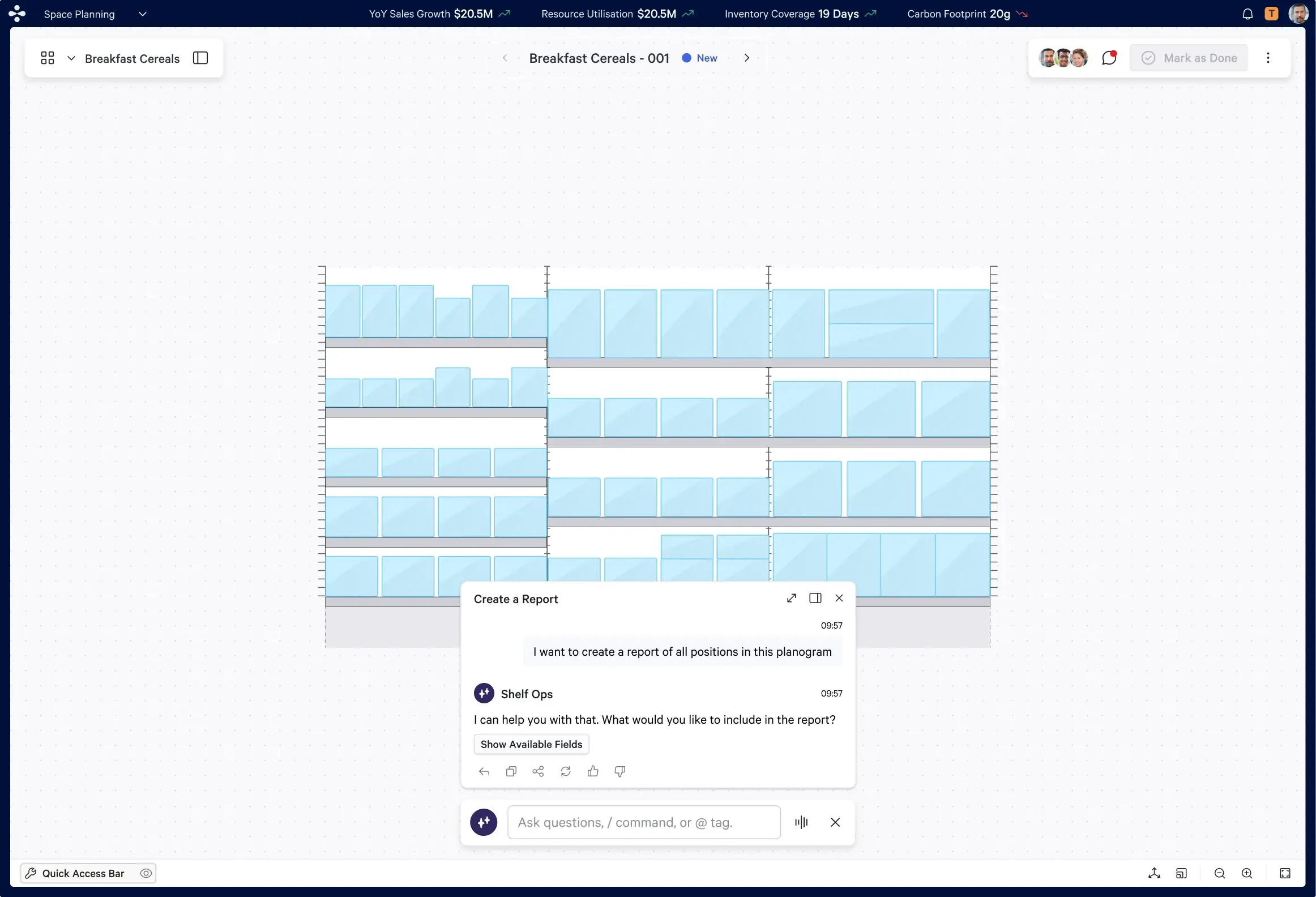
Floating Mode
The agent surfaces as a floating panel overlaid on the active planogram canvas — without disrupting the workspace. Ideal for quick queries and in-context suggestions while the planner continues working.
The panel can be repositioned, minimised, or expanded — full spatial control over canvas exposure.
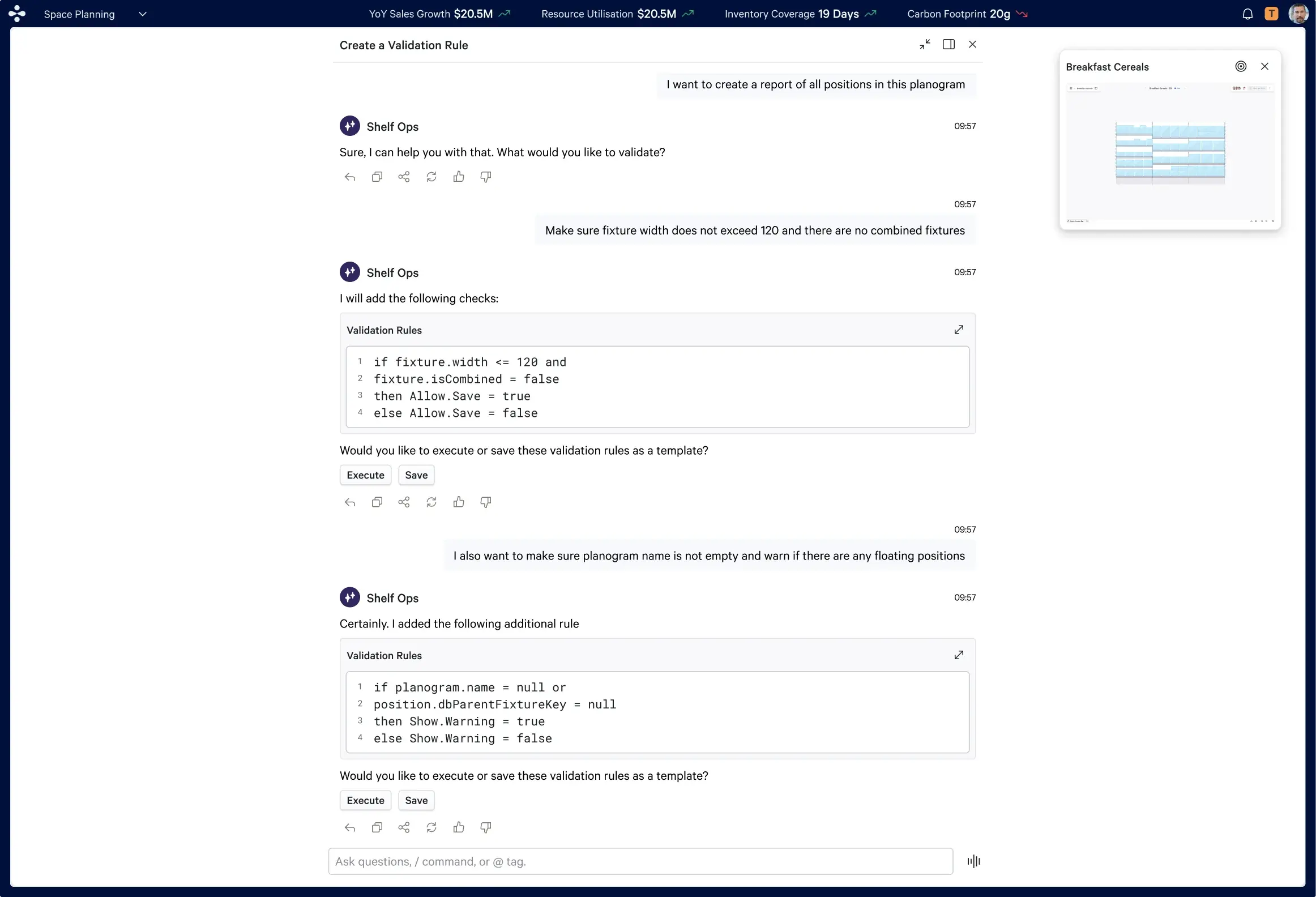
Full Screen Mode
When the task demands full focus — building a validation rule, generating a complex report — the agent expands to a dedicated full-screen view with a mini planogram thumbnail always visible for reference.
Optimised for sequential, multi-step flows. The agent guides through structured confirmations at every stage.
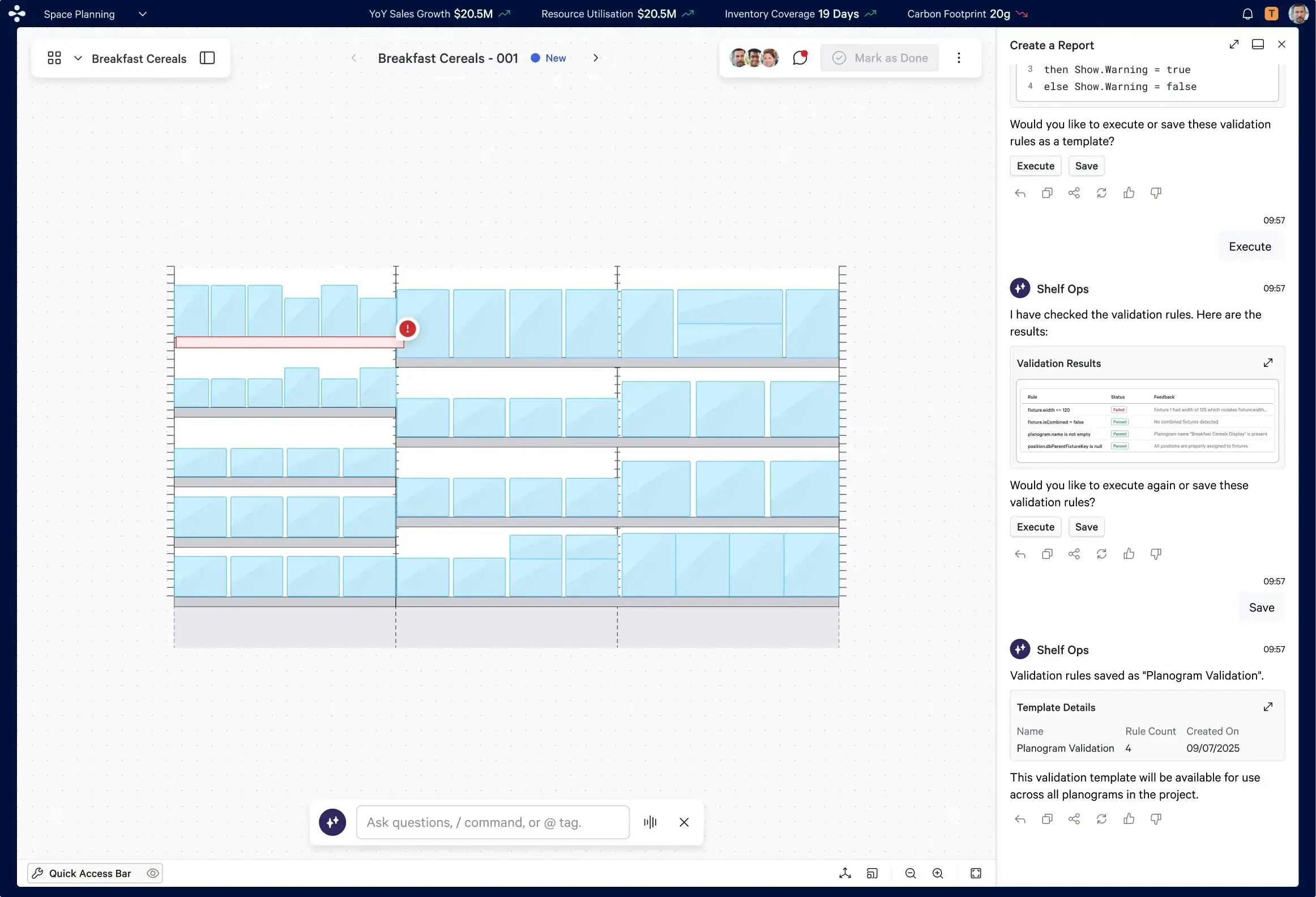
Adjacent Mode
The agent panel sits alongside the application in a persistent side panel — splitting the screen between the active planning canvas and the AI conversation in real time.
The default for power users. Persists across tasks, maintains conversation context, and surfaces errors directly on the canvas as visual indicators.
04.5 — Design Iterations
What usability testing forced us to change.
Five iterations came directly out of the Wizard-of-Oz sessions with 6 users — each one a response to a behavior we observed, not a hunch.
Conversational Filler Removal
Long, hedged AI responses got skipped. Cut to direct recommendations with the reasoning attached — not buried in preamble.
Implicit Over Explicit Confirmation
Users found "Type Yes to proceed" tedious and formal. Moved to inline, contextual confirmations that read as part of the conversation, not a form.
Visual Diff Views
Users consistently said "I need to see what changed before I approve." Every bulk action now shows a before/after diff.
The "Add to Chat" Feature
Category managers lost insights across scattered conversations when looping in directors. Letting the agent merge conversations and surface a consolidated summary cut navigation overhead.
Agent as Collaboration Enabler
Users wanted the agent present in multi-person discussions, not just 1:1 — able to summarize a conversation without leaking confidential data across users.
05 — Key Screens
The agent in production
Actual shipped screens from the CATMAN Space Planning application — showing ShelfOps Agent across all three interaction modes and the three core use cases delivered in the first release.
Create a Report — Floating Mode
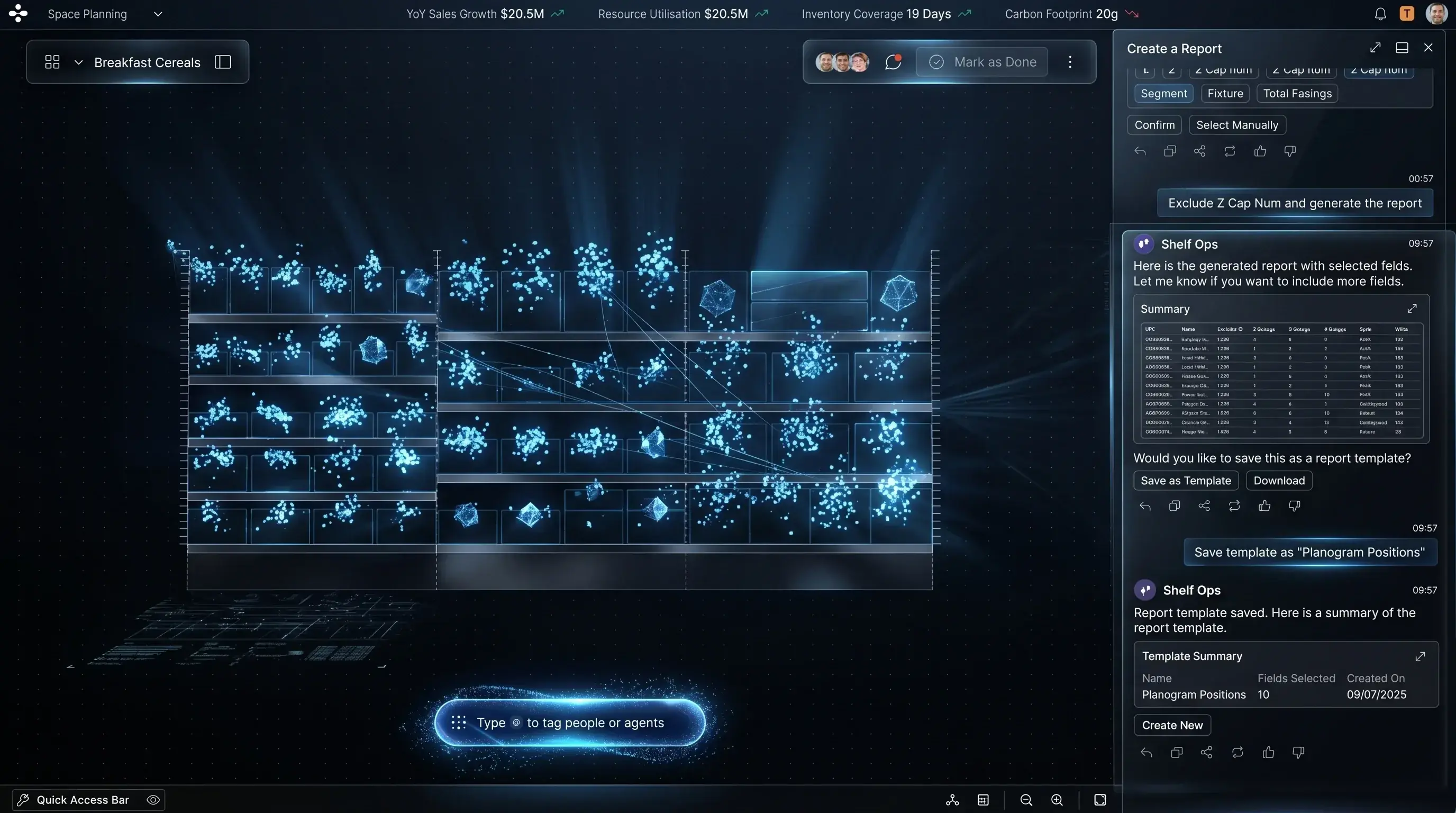
The agent surfaces as a floating panel over the Breakfast Cereals planogram canvas. The user initiates a report request in natural language; the agent responds with field options — canvas remains fully visible and interactive.
Create a Validation Rule — Full Screen
Agent translates a plain English instruction into executable validation logic. User can Execute or Save as template.
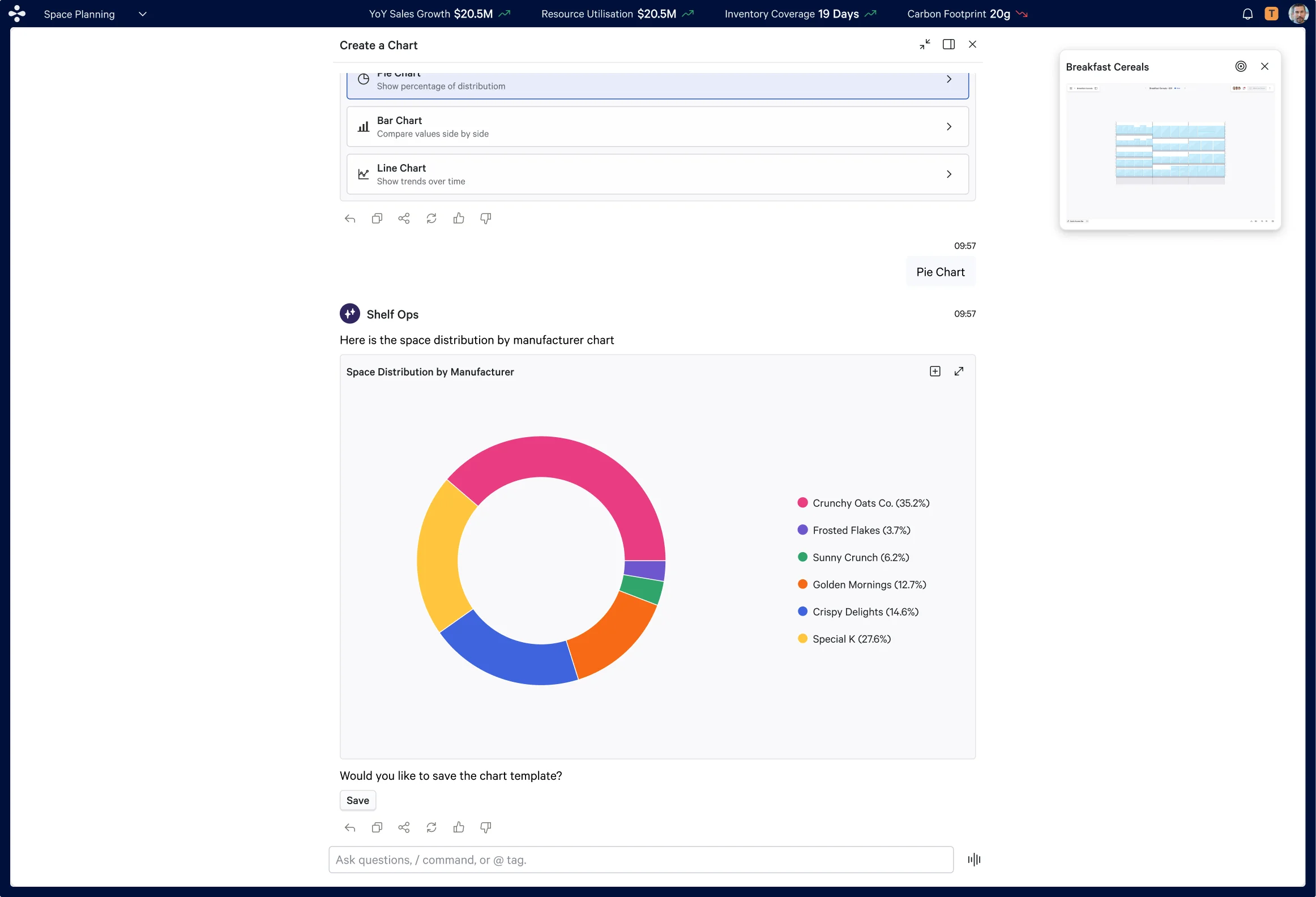
Create a Chart — Space Distribution
User selects Pie Chart; agent generates live space distribution by manufacturer with a save template option.
Validation Results — Adjacent Mode
The agent panel sits alongside the live canvas. After execution, validation results appear inline — the failing fixture is flagged directly on the planogram with a red error indicator, closing the loop between AI output and spatial reality.
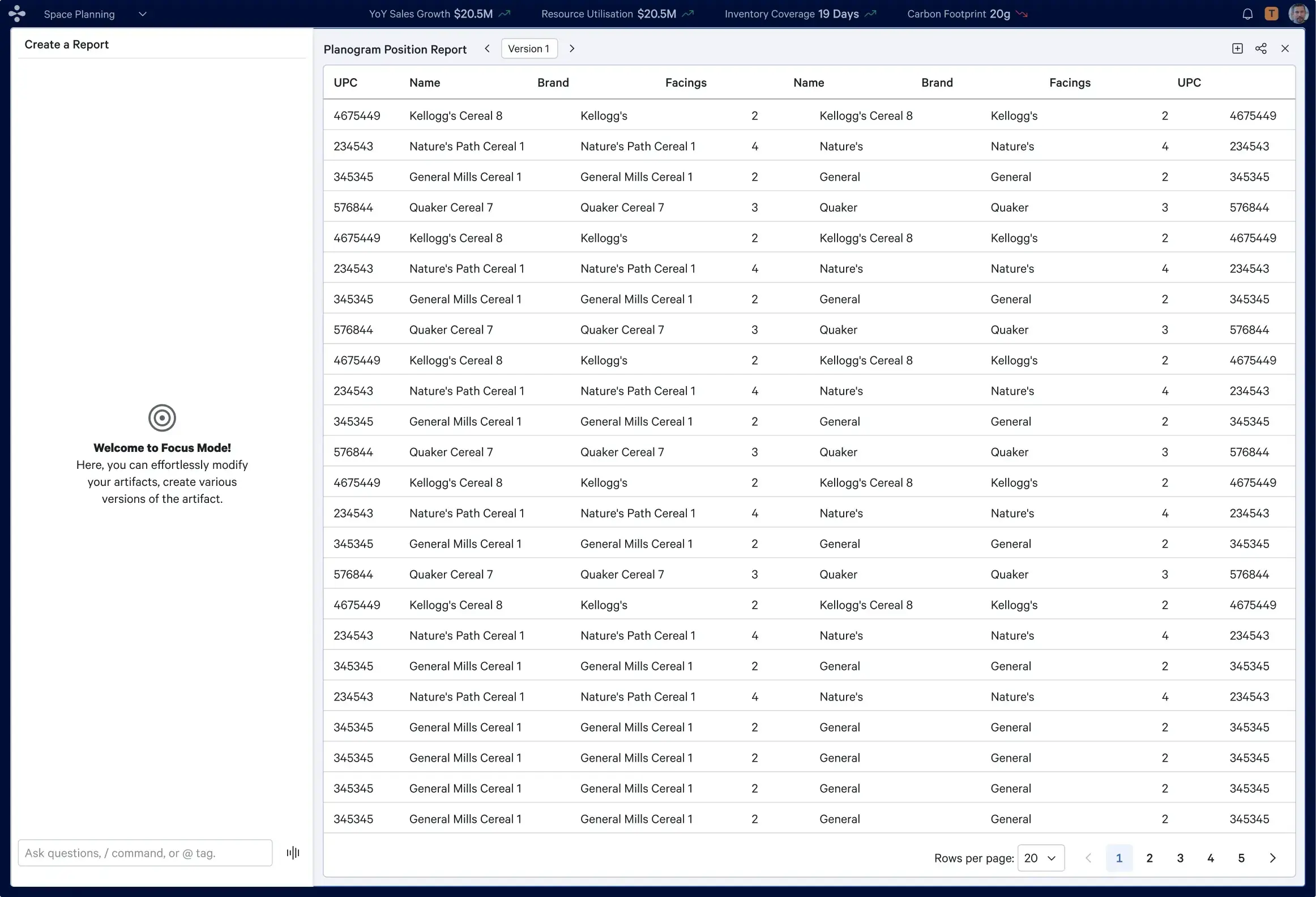
Planogram Position Report — Focus Mode
The generated report surfaces as a structured, paginated data table in Focus Mode — showing UPC, product name, brand, and facings across all planogram positions, versioned and ready to export.
06 — Impact
What shipped and what it meant
The ShelfOps Agent shipped as the first AI agent ever embedded in Blue Yonder CATMAN — transforming how category managers interact with planogram data across three distinct interaction modes.
45min → 4min
Time on task, bulk update
62% → 94%
Task completion rate
23% → 3%
Error rate
4.2 → 8.5 /10
User trust score
N/A → 4.6/5
CSAT
10
Core intents mapped
6
Shared entities
18
Structured interviews
6
Wizard‑of‑Oz users
07 — Reflection
What I learned designing for intelligence
Biggest Design Decision
Choosing three distinct interaction modes rather than forcing a single model was the call that made the agent truly usable. A floating panel mid-task is completely different from a full-screen session. One mode would have felt like a feature — not a tool.
What I'd Do Differently
Involve real category managers earlier in use case selection. Bulk promotional changes and compliance flagging came up repeatedly in research but didn't make the first scope cut. They should have been prioritised from day one.<br/><strong>Retrospective:</strong> We spent too much time perfecting happy paths and not enough on edge cases. Wizard‑of‑Oz testing revealed fallback gaps that could have surfaced in week 2 instead of week 12.
What This Project Taught Me
Enterprise AI is fundamentally an exercise in trust and behavioral change. The AI trust model must be established before the UI — every confirmation, explanation, and clarifying question exists solely to build confidence and prevent disengagement. If that trust breaks once, users disengage entirely. Get the trust model right before you get the UI right.
Tools & Methods
Figma · FigJam · Pendo analytics · Liveblocks · 8 concept validation sessions with category manager participants