Collaboration at Enterprise Scale
- My Role
- Lead UX Designer
- Timeline
- 2024 – 25
- Key Metric
- 3
- User roles with distinct permission levels — Super Admin, Editor, Reviewer
Core challenge
Enterprise · Real-time Collab
At a glance
Final solution at a glance
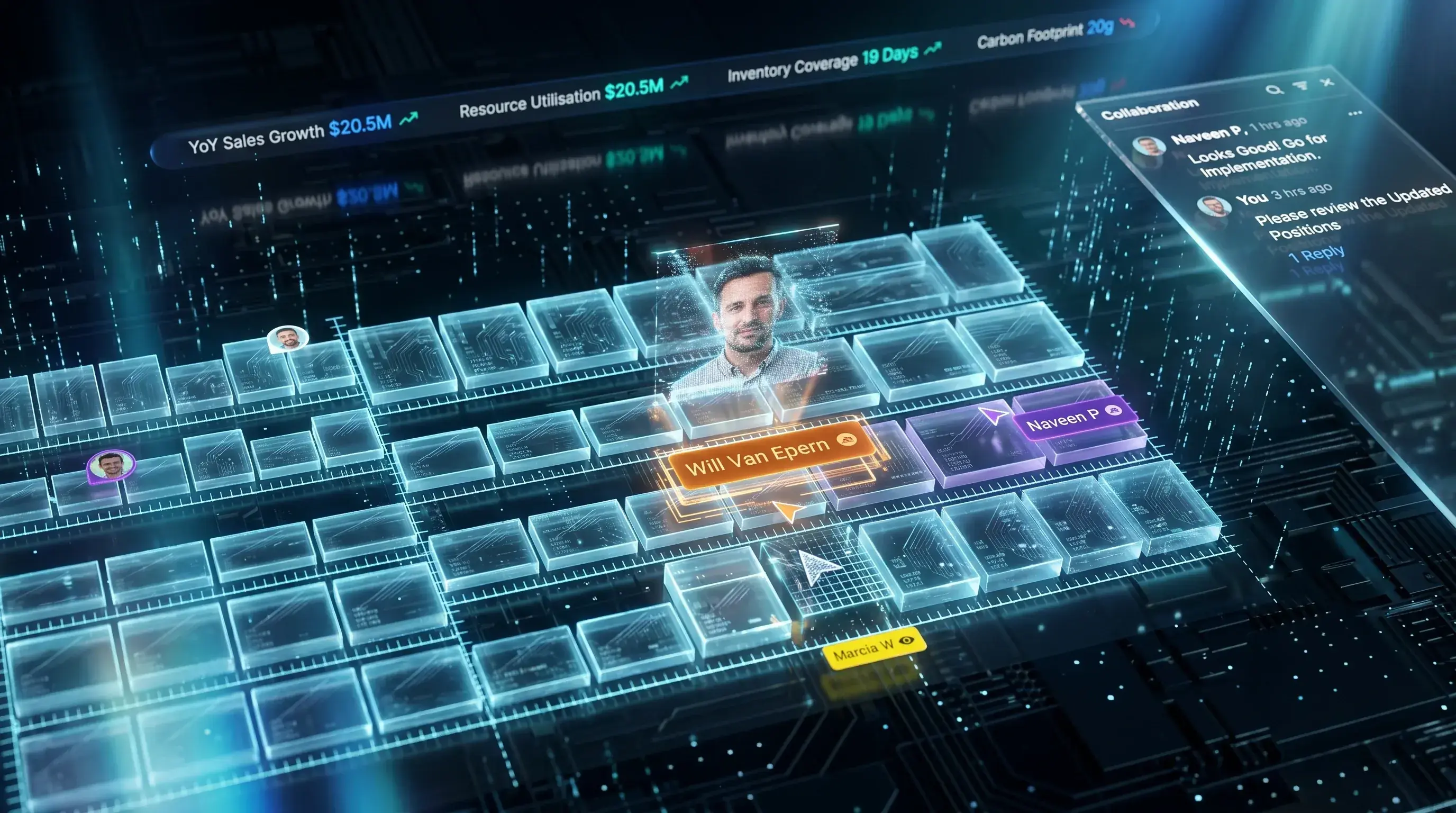
3
User roles with distinct permission levels — Super Admin, Editor, Reviewer
5+
Collaboration features shipped including live presence, comments, and conflict resolution
✓
Real-time sync with explicit conflict detection preventing silent data overwrites
✓
Shift from email-based collaboration to in-app live canvas sharing
01 — The Problem
Enterprise planning tools weren't built for teams — they were built for individuals.
Supply chain planning at scale is inherently a team sport. Planners, operations managers, brand managers, and executives all need to act on the same data — often at the same time. But the tools they were using were designed for single-user sessions. No real-time visibility into who else was working. No way to comment in context. No guardrails to prevent two planners from overwriting each other's decisions. Collaboration happened outside the product — in emails, in meetings, in hallways — and then someone would return to the tool and manually reconcile everything. This project was built to solve that.
A tool used by teams, designed for one.
The product had no real-time awareness layer. No user presence. No contextual communication. No conflict prevention. And no meaningful access control that reflected how planning organizations actually worked. The collaboration gap wasn't just a missing feature — it was causing real operational damage: overwritten decisions, duplicated effort, misaligned stakeholders, and planning cycles that depended on institutional memory rather than the product.
No Real-Time Presence Awareness
Planners had no visibility into who else was active in the product — editing the same plan, reviewing the same view, or about to make a conflicting decision. Every session felt like working in isolation, even when three people were simultaneously in the same planning context.
Last-Write-Wins Conflict Model
With no conflict detection or prevention, the tool defaulted to whichever save happened last. Planners unknowingly overwrote each other's decisions with no warning, no history, and no way to recover intent. The damage often wasn't discovered until a downstream impact surfaced.
Feedback Lived Outside the Product
All review, approval, and commentary happened in email threads and meetings — then someone manually transcribed the outcome back into the tool. There was no way to comment in context, attach reasoning to a decision, or create an auditable record of discussion within the product.
Access Control Didn't Reflect Reality
The existing permission model was blunt: access or no access. It didn't reflect how planning organizations actually worked — where a brand manager should be able to comment but not edit, a reviewer should be able to approve but not configure, and a super admin needed complete oversight without disrupting active workflows.
02 — Role & Process
Defining collaboration patterns that didn't exist anywhere in the organization.
This project had no internal precedent. No other team at Blue Yonder had designed real-time collaboration for a planning product at this level of complexity. That meant there was no existing pattern library to reference, no internal design benchmark to build on — and no room for a pattern that broke the planning workflow it was meant to enhance. I started from user behavior: how were teams actually trying to collaborate, where were they failing, and what did safe, non-disruptive collaboration need to feel like inside a high-stakes planning environment.
Mapping How Teams Actually Collaborated
Before designing anything, I mapped the real collaboration workflows — not the intended ones. Who was talking to whom, through which channels, about which decisions. I worked with PMs and planning stakeholders to understand the breakdown points: where decisions fell out of sync, where context was lost in translation, and what safe collaboration needed to preserve in a high-stakes planning environment.
Establishing the Non-Negotiables
Early discovery established the constraints that would shape every design decision: collaboration could never disrupt an active planning session, presence signals had to be ambient and non-intrusive, conflict prevention had to be explicit rather than silent, and access permissions had to reflect organizational hierarchy — not just a binary on/off switch. These constraints came directly from stakeholder validation, not assumptions.
Designing Three Interlocking Systems
The collaboration layer required three systems to work together: a real-time presence model (live cursors, active user indicators, section-level awareness), a contextual commenting system (threaded, anchored to specific plan elements, with resolution states), and a role-based access control architecture (Super Admin, Editor, Reviewer — with category and brand scoping). Each had to function independently and integrate seamlessly.
Making Presence Ambient, Not Alarming
The hardest interaction design challenge was making real-time presence feel helpful rather than surveillance-like. Live cursors needed to be visible without being distracting. Conflict warnings needed to be firm without being panic-inducing. The canvas collaboration state — showing live cursors, active comments, and editing locks simultaneously — was the most considered interaction in the project. Every element had to earn its place.
Validating With the People Who Would Break It
Iterative rounds with planners and ops stakeholders tested the hardest scenarios: two users editing the same cell simultaneously, a reviewer commenting on a plan an editor was mid-change on, a super admin revoking access during an active session. Edge cases weren't hypothetical — they were the test suite. Every iteration was driven by observed behavior under realistic operational pressure.
03 — Design Decisions
Three systems designed from first principles.
With no internal precedent and no competitor UI to open for reference — enterprise collaboration tools in this category are closed and proprietary — every pattern had to be reasoned from the ground up. The three decisions below defined the architecture of the entire collaboration layer.
Ambient Presence — Not Active Surveillance
The first design question was how visible to make real-time presence. Too prominent and it creates anxiety — planners feeling watched as they work. Too subtle and it fails to prevent conflict. The decision: ambient presence signals. Live cursors visible but lightweight. User avatars in the header indicating who is active in the current context. Section-level locks indicating when an area is being actively edited — without blocking access entirely. The goal was awareness without distraction: planners should always know who else is present, but never feel like they are being monitored.
Explicit Conflict Prevention — Not Silent Resolution
When two planners attempt to edit the same element simultaneously, there are two design options: silently resolve the conflict (last-write-wins, or merge automatically) or surface it explicitly and give users control. Silent resolution was rejected immediately — in a high-stakes planning environment, a silently overwritten decision can cascade into serious operational impact. The design chose explicit conflict surfacing: a clear, non-dismissible warning that names who is editing, what they are changing, and what the user's options are. Uncomfortable — but safe. The friction was the point.
Role-Based Access That Mirrors Org Reality
The previous access model was binary: you either had access or you didn't. Planning organizations don't work that way. A brand manager needs to see and comment on plans for their category — but shouldn't be able to edit supply parameters they don't own. A senior reviewer needs to approve decisions without being able to reconfigure the system. A super admin needs complete oversight without accidentally disrupting active workflows. The RBAC system was designed around three roles: Super Admin (full access, configuration rights, user management), Editor (create, edit, and submit plans within their scope), and Reviewer (read, comment, and approve — no edit rights). Each role was scoped to categories and brands, so a brand manager's Editor access only applied to their own products. The hierarchy reflected the actual organizational structure — not an approximation of it.
04 — Key Screens
The collaboration layer in action.
Five views that represent the core collaboration experience — from ambient presence awareness to conflict resolution, contextual commenting, and role-based access configuration.
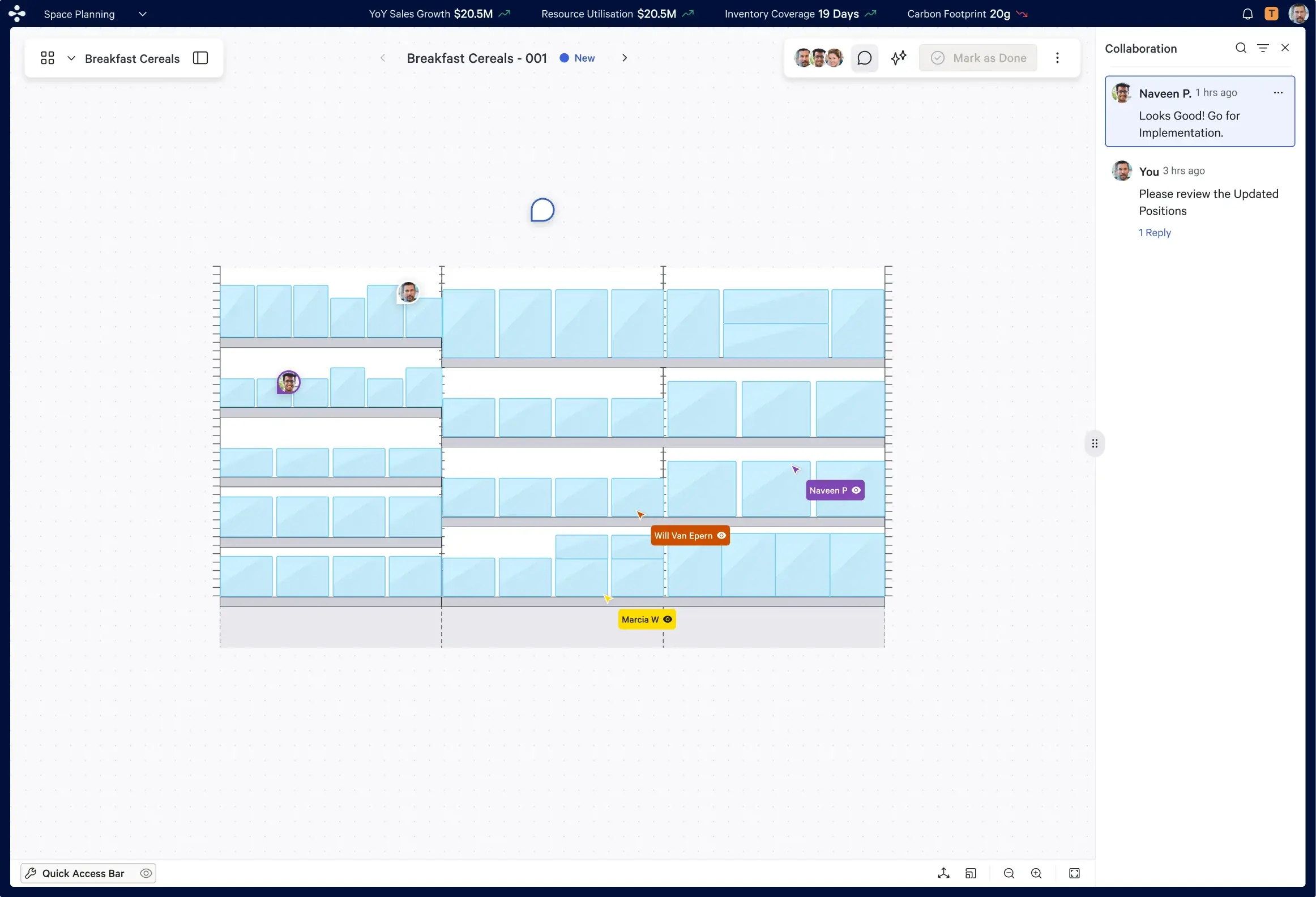
Canvas Collaboration — Ambient Presence
The core collaboration state. Three planners active simultaneously — live cursors visible, header avatars indicating presence, section locks signaling active edits. Aware of each other without being in each other's way.
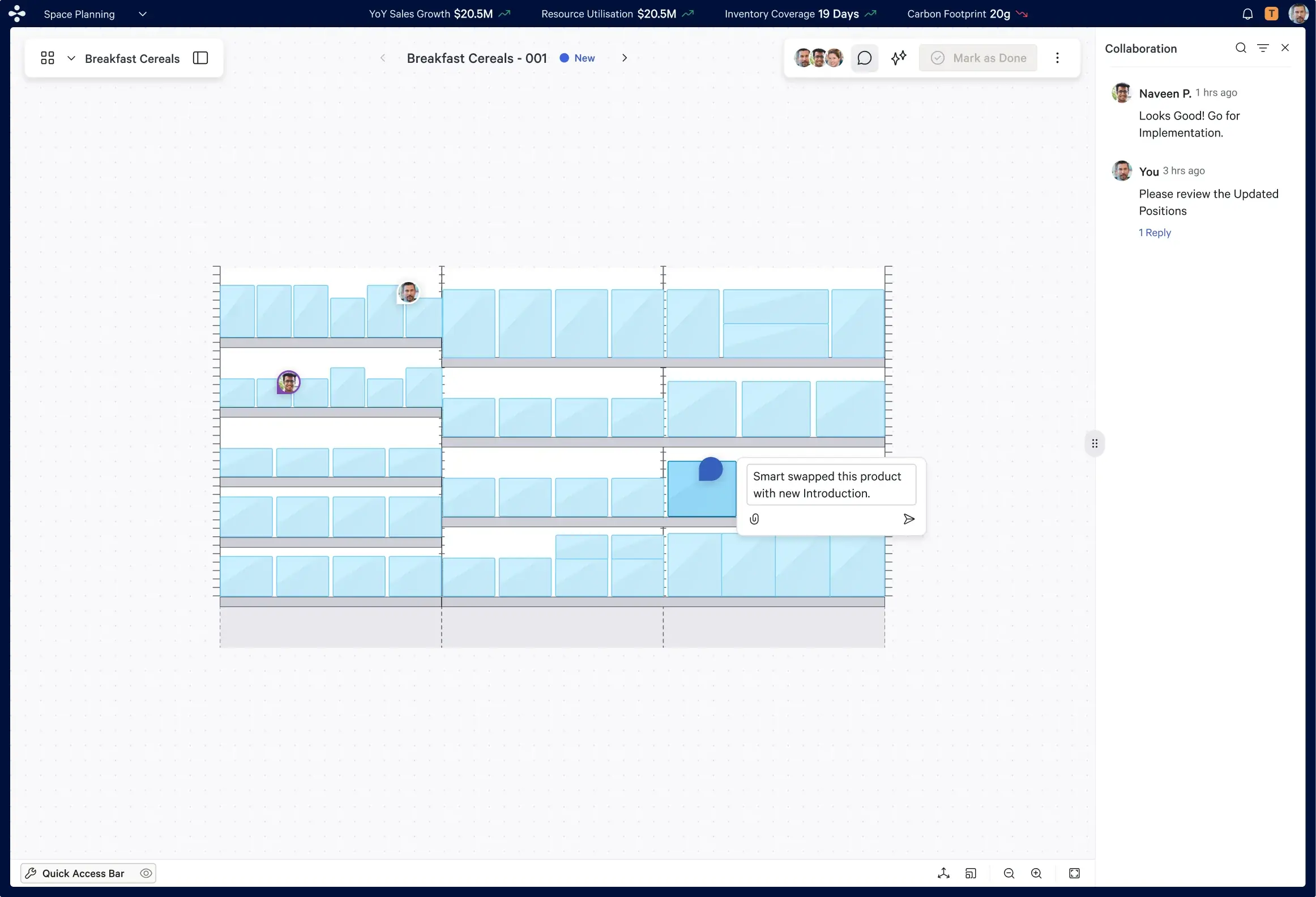
Edit Conflict — Explicit Resolution
When two planners collide on the same element, the conflict is surfaced — not silently resolved. The warning names the other user, describes the conflict, and requires a deliberate resolution. The friction is intentional: in a planning environment, silent overwrites cause real damage.
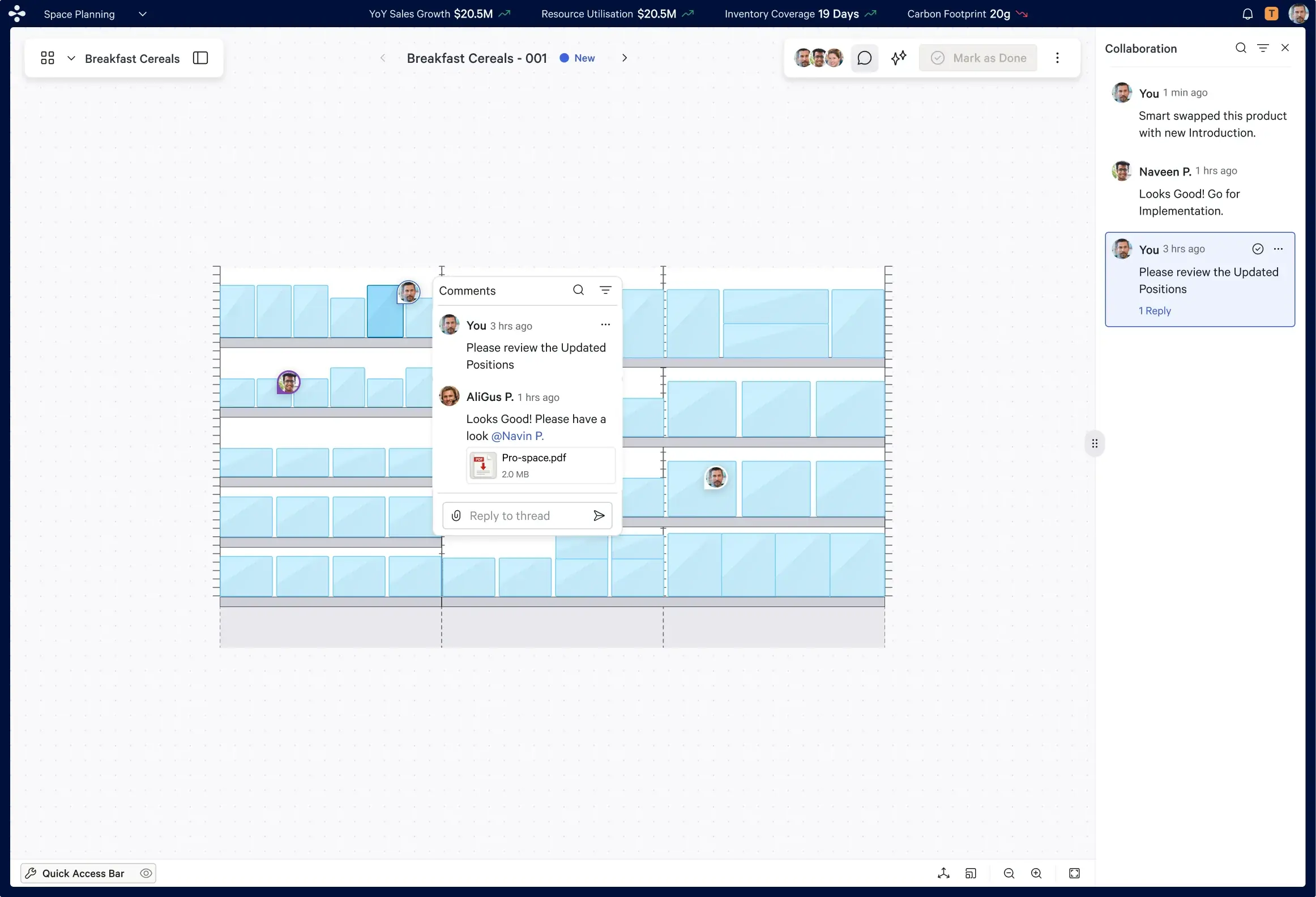
Contextual Comment — Threaded & Anchored
Comments anchored directly to the plan element they reference. Threaded. Resolvable. The feedback cycle that previously happened in email now lives inside the product — with full context and an auditable record.
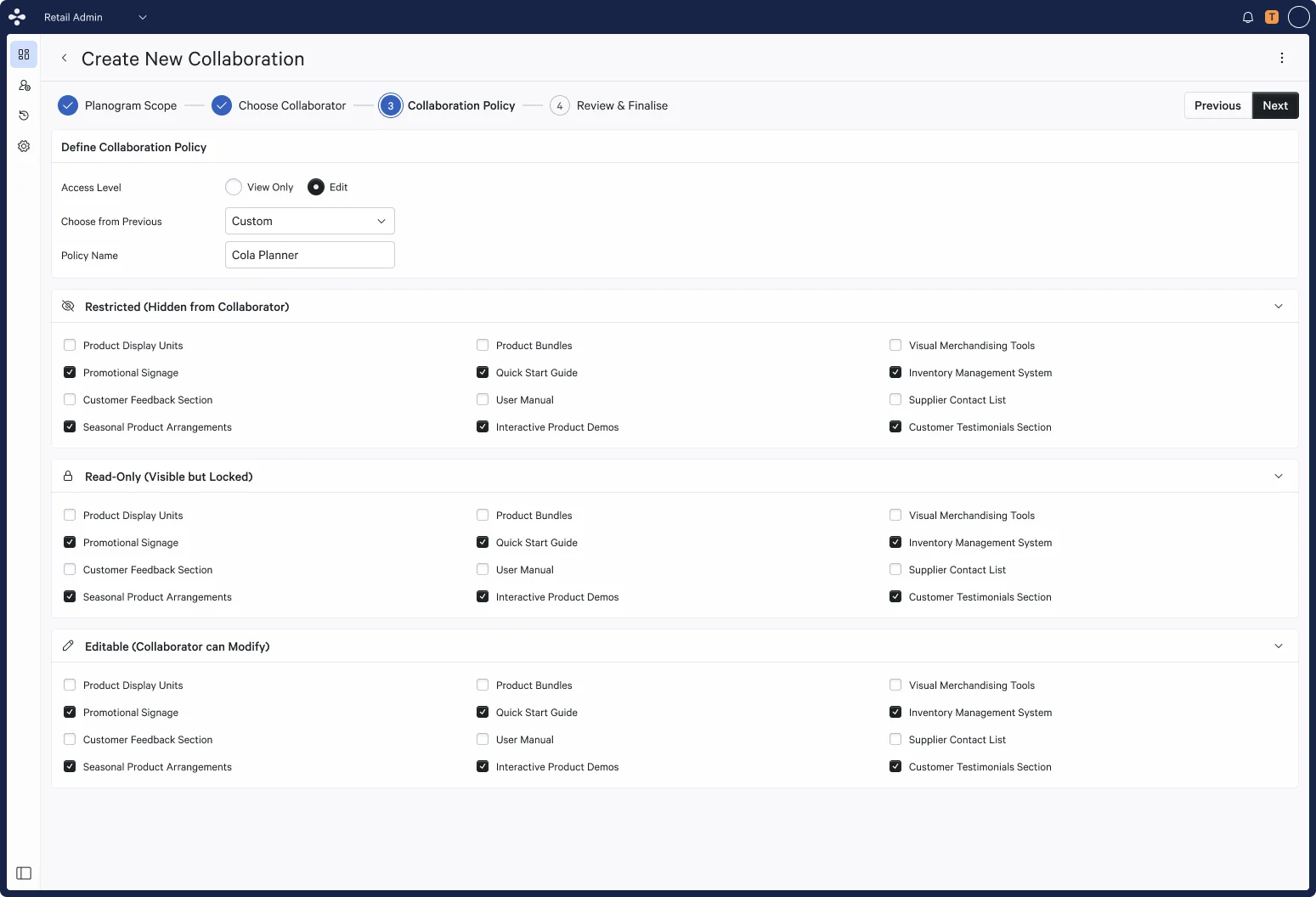
Role-Based Access — Configuration View
The RBAC configuration screen. Super Admin, Editor, and Reviewer roles assignable with category and brand-level scoping. A brand manager's Editor access applies only to their products — not the full plan.
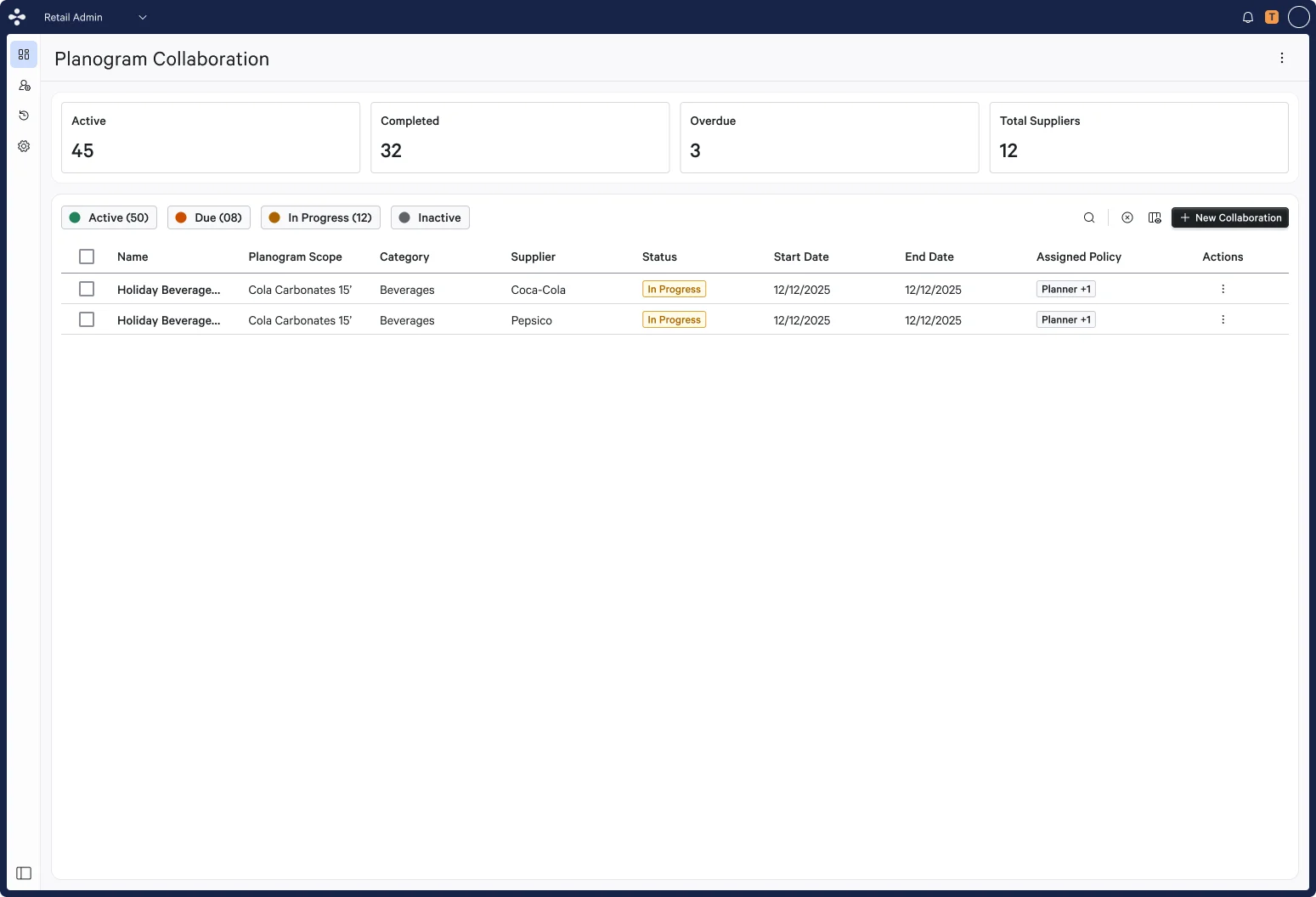
Reviewer Workflow — Approve Without Edit
The Reviewer experience. Full visibility into the plan, the ability to comment and approve — but no edit access. The role boundary is enforced in the UI itself, not just in the backend.
05 — Multi-Persona Design
One collaboration layer. Six personas. Completely different stakes.
System Administrator
Super AdminManages access without disrupting active planning sessions. Needs the full audit trail of decisions and changes — complete system oversight without friction.
Goals — Full oversight of users, roles, and configuration.
Supply Planner
EditorNeeds to create, edit, and submit plans within their assigned scope — with real-time awareness of who else is working in the same planning context.
Goals — Create, edit, submit plans within assigned scope.
Operations Manager
EditorNeeds macro-level plan editing with team visibility — understanding how changes at the category level affect the broader operational view.
Goals — Macro-level plan editing with team visibility.
Brand / Category Manager
ReviewerNeeds to comment, flag concerns, and approve changes within their brand scope — without edit access to data they don't own.
Goals — Comment, flag concerns, approve changes.
Senior Planning Reviewer
ReviewerNeeds cross-category oversight with approval authority — reviewing plans and decisions across multiple brand categories with full audit context.
Goals — Cross-category oversight with approval authority.
Executive / Stakeholder
ViewerNeeds read-only visibility into planning status, decisions, and history — without the ability to make changes or affect active workflows.
Goals — Read-only visibility into planning and history.
06 — Impact
Collaboration went from liability to capability.
Before this project, collaboration was a source of risk in the planning product — overwritten decisions, lost context, and feedback loops that depended on institutional memory rather than the tool itself. After shipping, the collaboration layer became a differentiator: the product finally reflected how planning teams actually worked, not how single-user tools forced them to work around it. The most meaningful validation came from planners who said they no longer needed to email screenshots back and forth — they could just look at the same canvas, at the same time, and see the same thing.
3
User roles with distinct permission levels — Super Admin, Editor, Reviewer
5+
Collaboration features shipped including live presence, comments, and conflict resolution
✓
Real-time sync with explicit conflict detection preventing silent data overwrites
✓
Shift from email-based collaboration to in-app live canvas sharing
07 — Reflection
What I learned designing collaborative planning tools.
Biggest Design Decision
The three-tier RBAC model with explicit conflict resolution was the call that made collaboration safe. Giving Super Admin, Editor, and Reviewer distinct capabilities — and enforcing those boundaries in the UI itself — meant collaborative freedom didn't come at the cost of data integrity. The conflict warning was deliberately non-dismissible: in a planning environment, silent overwrites cause real damage.
What I'd Do Differently
Start the real-time sync architecture conversations with engineering earlier. The collaboration patterns were designed before the technical feasibility of live presence and conflict detection was fully validated. Front-loading those technical discussions would have reduced iteration cycles and produced a tighter handoff between design and implementation.
What This Project Taught Me
Collaboration is a trust model, not a feature set. The hardest problems weren't about cursors or comments — they were about who gets to make which decision, how conflicts are surfaced, and how the system protects the integrity of the plan when multiple people are acting on it simultaneously. Get the trust and safety model right before you build the real-time features.
Tools & Methods
Figma · FigJam · Liveblocks · RBAC modeling · Real-time collaboration pattern research · Cross-functional workshops with product and engineering · Usability testing with planning stakeholders · Iterative prototype validation